Sunday, 20 September 2015

ORA-00600: internal error code, arguments: [kcratr_scan_lastbwr], [], [], [], [], [], [], [], [], [], [], []


You might face this error while starting Database.

SQL> startup
ORACLE instance started.

Total System Global Area 9620525056 bytes
Fixed Size                  2261368 bytes
Variable Size            3254783624 bytes
Database Buffers         6341787648 bytes
Redo Buffers               21692416 bytes
Database mounted.
ORA-00600: internal error code, arguments: [kcratr_scan_lastbwr], [], [], [],
[], [], [], [], [], [], [], []


Reason: It is due to server crash might be due to hardware or power failure.

Solution:

Recover the database by following the below steps:

Step 1) Shutdown the instance and open in mount state:

SQL>shutdown immediate;
ORACLE instance shut down.

SQL> startup mount;
ORACLE instance started.

Total System Global Area 9620525056 bytes
Fixed Size                  2261368 bytes
Variable Size            3254783624 bytes
Database Buffers         6341787648 bytes
Redo Buffers               21692416 bytes
Database mounted.

Step 2) Recover Database

SQL> recover database;
Media recovery complete.

Step 3) Open the Database

SQL> alter database open;

Database altered.

Step 4) Shutdown and startup normally

SQL> shutdown immediate;
Database closed.
Database dismounted.
ORACLE instance shut down.


SQL> startup
ORACLE instance started.

Total System Global Area 9620525056 bytes
Fixed Size                  2261368 bytes
Variable Size            3254783624 bytes
Database Buffers         6341787648 bytes
Redo Buffers               21692416 bytes
Database mounted.
Database opened.

Monday, 6 July 2015

Fusion Applications Installation - Part 1

Fusion Applications Installation comprises of 2 parts
Part 1) IDM node Installation
Part 2) FA node Installation
Node 1
idmhost
1. Identity and Access Management components
(OID, OVD, OIF, OAM, OIM, SOA)
2. Oracle Database for IDM
Node 2
fahost
1. Fusion Applications Domains
2. Oracle Database for Fusion Apps
Hardware Requirements:

IDM Node:
Memory: Minimum 16GB
Disk Size – 300GB

FA Node:
Memory Requirement: 140GB
Disk Size – 500GB
We will use Oracle Linux x86-64 Operating System for Installation. Software can be downloaded from http://edelivery.oracle.com

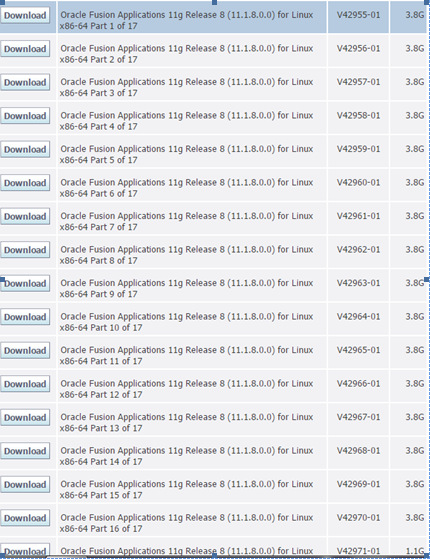
1)   Downloading the Installation media

Download first 17 parts of installable:

2)   Create a staging directory
Unzip all the files in single directory.

More on this will be covered in next post !

Thursday, 2 July 2015

Fusion Applications Product and Product offerings

Each product in Fusion Applications is deployed as a Domain. Each domain has J2EE applications which provides certain functionality. These functionality or features provided by the J2EE applications can be considered as product offerings.
A product family is collection of one or more product offerings.

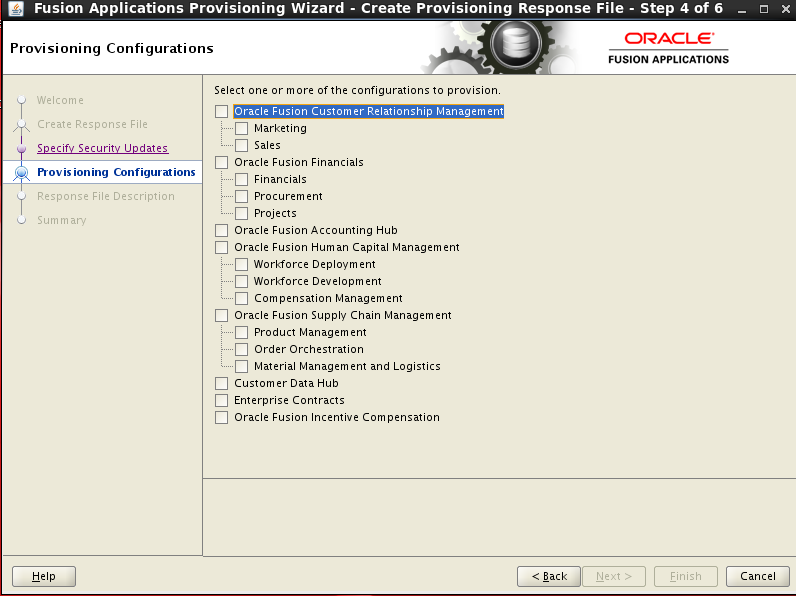
During installation of Fusion Applications you will get the below screen, where you can select a product or product offerings as per your requirement.

image.png

Please note, once selected it cannot be changed later during/after installation, so be very sure before you click on Next button.

A brief description of various Product Family as below:

Product Family
Product Offering
Oracle Fusion Customer Relationship Management
Marketing
Sales
Customer Data Hub
Enterprise Contracts
Oracle Fusion Financials
Financials
Accounting Hub
Oracle Fusion Human Capital Management
Workforce Deployment
Workforce Development
Compensation Management
Oracle Fusion Procurement
Procurement
Oracle Fusion Supply Chain Management
•Product Management
•Order Orchestration
•Material Management and Logistics
Oracle Fusion Project Portfolio Management
Projects

Tuesday, 30 June 2015

Oracle Fusion Applications- Basic Architecture


Oracle Fusion Applications are built on Fusion Middleware stack.

A very basic deployment architecture can be depicted by the below figure. It will consist of two nodes:

Basic 2 Node Architecture


1. IDM Node
It is used for User and Role Management. All the user and privileges of FA are stored in IDM node. It performs below functions:


IDM Node


- Authentication, Authorization and auditing mechanisms
- Roles and entitlements
- Directory Services
- User Provisioning
- Policy Stores
- Session Management
- Single Sign on / Federation


2) FA Node
It will include best in class Product Families like:
- Oracle Fusion Financials
- Oracle Fusion HCM
- Oracle Fusion Procurement
- Oracle Fusion SCM
- Oracler Fusion CRM

FA Node
Read more on Product and Product offerings in next Post

Saturday, 20 June 2015

Test Database Connectivity from Weblogic Server to the Database

This post helps us to establish connectivity to the database from the Weblogic Server.

Go to MWHOME location

cd <WEBLOGIC HOME>/server/bin
set the environment
. ./setWLSEnv.sh

Run the below to test the connectivity.

java utils.dbping ORACLE_THIN <DB_USER_NAME> <DB_PASSWORD> <DB_HOST>:<DB_PORT>:<SID>

This will test the connection and display the results.

The result would be as below for a successful connection :

java utils.dbping ORACLE_THIN <DB_USER_NAME> <DB_PASSWORD> <DB_HOST>:<DB_PORT>:<SID>

**** Success!!! ****

You can connect to the database in your app using:

  java.util.Properties props = new java.util.Properties();
  props.put("user", "<DB_USER>");
  props.put("password", "<PASSWORD>");
  java.sql.Driver d =
    Class.forName("oracle.jdbc.OracleDriver").newInstance();
  java.sql.Connection conn =
    Driver.connect("<DB_USER>", props);

Monday, 8 June 2015

Mac Love

After years of waiting and dreaming I was able to get my love home. It was a life changing experience, so beautiful, full of colors and sound it was. 
Like a new bride it was sitting on my bed, I was too scared to do anything as I did not know how it will react to my touch.
Finally I gathered courage to open it, it prompted me to enter name, and that was the moment when I realized it's mine now.
Amit's Mac pro !! :) :)