Friday, 17 July 2015

Monday, 6 July 2015
Fusion Applications Installation - Part 1
Fusion Applications Installation comprises of 2 parts
Part 1) IDM node Installation
Part 2) FA node Installation
Node 1
|
idmhost
|
1. Identity and Access Management components
(OID, OVD, OIF, OAM, OIM, SOA)
2. Oracle Database for IDM
|
Node 2
|
fahost
|
1. Fusion Applications Domains
2. Oracle Database for Fusion Apps
|
Hardware Requirements:
IDM Node:
Memory: Minimum 16GB
Disk Size – 300GB
FA Node:
Memory Requirement: 140GB
Disk Size – 500GB
We will use Oracle Linux x86-64 Operating System for Installation. Software can be downloaded from http://edelivery.oracle.com
1) Downloading the Installation media

Login to http://edelivery.oracle.com
Download first 17 parts of installable:
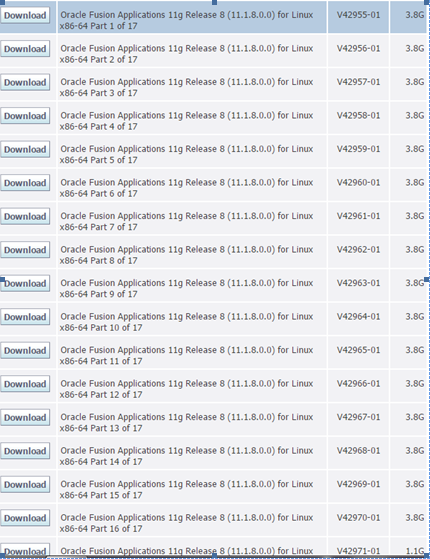
2) Create a staging directory
Unzip all the files in single directory.
More on this will be covered in next post !
Thursday, 2 July 2015
Fusion Applications Product and Product offerings
Each product in Fusion Applications is deployed as a Domain. Each domain has J2EE applications which provides certain functionality. These functionality or features provided by the J2EE applications can be considered as product offerings.
A product family is collection of one or more product offerings.
During installation of Fusion Applications you will get the below screen, where you can select a product or product offerings as per your requirement.
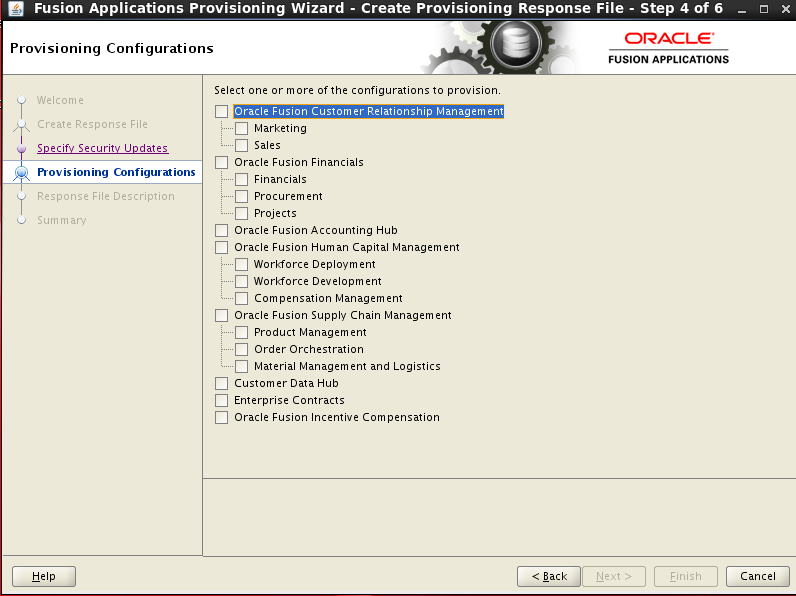
Please note, once selected it cannot be changed later during/after installation, so be very sure before you click on Next button.
Product Family
|
Product Offering
|
Oracle Fusion Customer Relationship Management
|
Marketing
Sales
Customer Data Hub
Enterprise Contracts
|
Oracle Fusion Financials
|
Financials
Accounting Hub
|
Oracle Fusion Human Capital Management
|
Workforce Deployment
Workforce Development
Compensation Management
|
Oracle Fusion Procurement
|
Procurement
|
Oracle Fusion Supply Chain Management
|
•Product Management
•Order Orchestration
•Material Management and Logistics
|
Oracle Fusion Project Portfolio Management
|
Projects
|
Tuesday, 30 June 2015
Oracle Fusion Applications- Basic Architecture
Oracle Fusion Applications are built on Fusion Middleware stack.
A very basic deployment architecture can be depicted by the below figure. It will consist of two nodes:
 |
| Basic 2 Node Architecture |
1. IDM Node
It is used for User and Role Management. All the user and privileges of FA are stored in IDM node. It performs below functions:
 |
| IDM Node |
- Roles and entitlements
- Directory Services
- User Provisioning
- Policy Stores
- Session Management
- Single Sign on / Federation
2) FA Node
It will include best in class Product Families like:
- Oracle Fusion Financials
- Oracle Fusion HCM
- Oracle Fusion Procurement
- Oracle Fusion SCM
- Oracler Fusion CRM
 |
| FA Node |
Saturday, 20 June 2015
Test Database Connectivity from Weblogic Server to the Database
This post helps us to establish connectivity to the database from the Weblogic Server.
Go to MWHOME location
cd <WEBLOGIC HOME>/server/bin
set the environment
. ./setWLSEnv.sh
Run the below to test the connectivity.
java utils.dbping ORACLE_THIN <DB_USER_NAME> <DB_PASSWORD> <DB_HOST>:<DB_PORT>:<SID>
This will test the connection and display the results.
The result would be as below for a successful connection :
java utils.dbping ORACLE_THIN <DB_USER_NAME> <DB_PASSWORD> <DB_HOST>:<DB_PORT>:<SID>
**** Success!!! ****
You can connect to the database in your app using:
java.util.Properties props = new java.util.Properties();
props.put("user", "<DB_USER>");
props.put("password", "<PASSWORD>");
java.sql.Driver d =
Class.forName("oracle.jdbc.OracleDriver").newInstance();
java.sql.Connection conn =
Driver.connect("<DB_USER>", props);
Go to MWHOME location
cd <WEBLOGIC HOME>/server/bin
set the environment
. ./setWLSEnv.sh
Run the below to test the connectivity.
java utils.dbping ORACLE_THIN <DB_USER_NAME> <DB_PASSWORD> <DB_HOST>:<DB_PORT>:<SID>
This will test the connection and display the results.
The result would be as below for a successful connection :
java utils.dbping ORACLE_THIN <DB_USER_NAME> <DB_PASSWORD> <DB_HOST>:<DB_PORT>:<SID>
**** Success!!! ****
You can connect to the database in your app using:
java.util.Properties props = new java.util.Properties();
props.put("user", "<DB_USER>");
props.put("password", "<PASSWORD>");
java.sql.Driver d =
Class.forName("oracle.jdbc.OracleDriver").newInstance();
java.sql.Connection conn =
Driver.connect("<DB_USER>", props);
Monday, 8 June 2015
Mac Love
After years of waiting and dreaming I was able to get my love home. It was a life changing experience, so beautiful, full of colors and sound it was.
Like a new bride it was sitting on my bed, I was too scared to do anything as I did not know how it will react to my touch.
Finally I gathered courage to open it, it prompted me to enter name, and that was the moment when I realized it's mine now.
Amit's Mac pro !! :) :)
Like a new bride it was sitting on my bed, I was too scared to do anything as I did not know how it will react to my touch.
Finally I gathered courage to open it, it prompted me to enter name, and that was the moment when I realized it's mine now.
Amit's Mac pro !! :) :)
Friday, 5 June 2015
JMS Client could not establish connection with weblogic server
Issue :
When an external application tries to establish connection to the weblogic JMS server, the connection does not seem to work.
We observe the below error in the logs :
weblogic.jms.common.JMSException: weblogic.messaging.dispatcher.DispatcherException: Could not register a DisconnectListener for [Delegate(253822924) [weblogic.iiop.IOR[RMI:weblogic.messaging.dispatcher.DispatcherImpl:0000000000000000] @<ip addres>:48508, <0, null>]] for weblogic.jms.C:vmohsitut151:od8:-419rn532v3nc
at weblogic.jms.frontend.FEConnectionFactory.connectionCreateInternal(FEConnectionFactory.java:371)
at weblogic.jms.frontend.FEConnectionFactoryImpl.connectionCreateInternal(FEConnectionFactoryImpl.java:79)
at weblogic.jms.frontend.FEConnectionFactoryImpl.connectionCreateRequest(FEConnectionFactoryImpl.java:62)
at weblogic.jms.frontend.FEConnectionFactoryImpl_WLSkel.invoke(Unknown Source)
at weblogic.rmi.internal.BasicServerRef.invoke(BasicServerRef.java:667)
at weblogic.rmi.cluster.ClusterableServerRef.invoke(ClusterableServerRef.java:230)
at weblogic.rmi.internal.BasicServerRef$1.run(BasicServerRef.java:522)
at weblogic.security.acl.internal.AuthenticatedSubject.doAs(AuthenticatedSubject.java:363)
at weblogic.security.service.SecurityManager.runAs(SecurityManager.java:146)
at weblogic.rmi.internal.BasicServerRef.handleRequest(BasicServerRef.java:518)
at weblogic.rmi.internal.wls.WLSExecuteRequest.run(WLSExecuteRequest.java:118)
at weblogic.work.ExecuteThread.execute(ExecuteThread.java:263)
at weblogic.work.ExecuteThread.run(ExecuteThread.java:221)
Caused by: weblogic.messaging.dispatcher.DispatcherException: Could not register a DisconnectListener for [Delegate(253822924) [weblogic.iiop.IOR[RMI:weblogic.messaging.dispatcher.DispatcherImpl:0000000000000000] @<ip addres>:48508, <0, null>]] for weblogic.jms.C:vmohsitut151:od8:-419rn532v3nc
at weblogic.messaging.dispatcher.DispatcherWrapperState.addPeerGoneListener(DispatcherWrapperState.java:412)
at weblogic.messaging.dispatcher.DispatcherWrapperState.<init>(DispatcherWrapperState.java:79)
at weblogic.messaging.dispatcher.DispatcherManager.dispatcherAdd(DispatcherManager.java:222)
at weblogic.messaging.dispatcher.DispatcherManager.addDispatcherReference(DispatcherManager.java:118)
at weblogic.jms.dispatcher.JMSDispatcherManager.addDispatcherReference(JMSDispatcherManager.java:187)
at weblogic.jms.frontend.FEConnectionFactory.connectionCreateInternal(FEConnectionFactory.java:368)
... 12 more
Caused by: weblogic.rmi.extensions.DisconnectMonitorUnavailableException: Could not register a DisconnectListener for [Delegate(253822924) [weblogic.iiop.IOR[RMI:weblogic.messaging.dispatcher.DispatcherImpl:0000000000000000] @<ip addres>:48508, <0, null>]]
at weblogic.rmi.extensions.DisconnectMonitorListImpl.addDisconnectListener(DisconnectMonitorListImpl.java:83)
at weblogic.messaging.dispatcher.DispatcherWrapperState.addPeerGoneListener(DispatcherWrapperState.java:409)
... 17 more
Observations made :
This issue does not occur if the source client ( from where the connection to WLS JMS is made ) and Weblogic server are in the same network subnet.
The above issue has been observed under two conditions :
--> If these 2 systems are on different network
or
--> If the two systems are on different subnet in the same network
Solution :
On the client side, Try to find out which weblogic jar file is being used to make the connection.
If the wlclient.jar file is used for making the connection, then this is the root cause of the issue. Instead of using the wlclient.jar, please use wlthint3client.jar and then try to make a connection to the weblogic JMS.
In our case, wlclient.jar file was being used and we replaced it with wlthint3client.jar
This resolved the issue.
After making the changes, our application file which made connection to JMS looked like below :
When an external application tries to establish connection to the weblogic JMS server, the connection does not seem to work.
We observe the below error in the logs :
weblogic.jms.common.JMSException: weblogic.messaging.dispatcher.DispatcherException: Could not register a DisconnectListener for [Delegate(253822924) [weblogic.iiop.IOR[RMI:weblogic.messaging.dispatcher.DispatcherImpl:0000000000000000] @<ip addres>:48508, <0, null>]] for weblogic.jms.C:vmohsitut151:od8:-419rn532v3nc
at weblogic.jms.frontend.FEConnectionFactory.connectionCreateInternal(FEConnectionFactory.java:371)
at weblogic.jms.frontend.FEConnectionFactoryImpl.connectionCreateInternal(FEConnectionFactoryImpl.java:79)
at weblogic.jms.frontend.FEConnectionFactoryImpl.connectionCreateRequest(FEConnectionFactoryImpl.java:62)
at weblogic.jms.frontend.FEConnectionFactoryImpl_WLSkel.invoke(Unknown Source)
at weblogic.rmi.internal.BasicServerRef.invoke(BasicServerRef.java:667)
at weblogic.rmi.cluster.ClusterableServerRef.invoke(ClusterableServerRef.java:230)
at weblogic.rmi.internal.BasicServerRef$1.run(BasicServerRef.java:522)
at weblogic.security.acl.internal.AuthenticatedSubject.doAs(AuthenticatedSubject.java:363)
at weblogic.security.service.SecurityManager.runAs(SecurityManager.java:146)
at weblogic.rmi.internal.BasicServerRef.handleRequest(BasicServerRef.java:518)
at weblogic.rmi.internal.wls.WLSExecuteRequest.run(WLSExecuteRequest.java:118)
at weblogic.work.ExecuteThread.execute(ExecuteThread.java:263)
at weblogic.work.ExecuteThread.run(ExecuteThread.java:221)
Caused by: weblogic.messaging.dispatcher.DispatcherException: Could not register a DisconnectListener for [Delegate(253822924) [weblogic.iiop.IOR[RMI:weblogic.messaging.dispatcher.DispatcherImpl:0000000000000000] @<ip addres>:48508, <0, null>]] for weblogic.jms.C:vmohsitut151:od8:-419rn532v3nc
at weblogic.messaging.dispatcher.DispatcherWrapperState.addPeerGoneListener(DispatcherWrapperState.java:412)
at weblogic.messaging.dispatcher.DispatcherWrapperState.<init>(DispatcherWrapperState.java:79)
at weblogic.messaging.dispatcher.DispatcherManager.dispatcherAdd(DispatcherManager.java:222)
at weblogic.messaging.dispatcher.DispatcherManager.addDispatcherReference(DispatcherManager.java:118)
at weblogic.jms.dispatcher.JMSDispatcherManager.addDispatcherReference(JMSDispatcherManager.java:187)
at weblogic.jms.frontend.FEConnectionFactory.connectionCreateInternal(FEConnectionFactory.java:368)
... 12 more
Caused by: weblogic.rmi.extensions.DisconnectMonitorUnavailableException: Could not register a DisconnectListener for [Delegate(253822924) [weblogic.iiop.IOR[RMI:weblogic.messaging.dispatcher.DispatcherImpl:0000000000000000] @<ip addres>:48508, <0, null>]]
at weblogic.rmi.extensions.DisconnectMonitorListImpl.addDisconnectListener(DisconnectMonitorListImpl.java:83)
at weblogic.messaging.dispatcher.DispatcherWrapperState.addPeerGoneListener(DispatcherWrapperState.java:409)
... 17 more
Observations made :
This issue does not occur if the source client ( from where the connection to WLS JMS is made ) and Weblogic server are in the same network subnet.
The above issue has been observed under two conditions :
--> If these 2 systems are on different network
or
--> If the two systems are on different subnet in the same network
Solution :
On the client side, Try to find out which weblogic jar file is being used to make the connection.
If the wlclient.jar file is used for making the connection, then this is the root cause of the issue. Instead of using the wlclient.jar, please use wlthint3client.jar and then try to make a connection to the weblogic JMS.
In our case, wlclient.jar file was being used and we replaced it with wlthint3client.jar
This resolved the issue.
After making the changes, our application file which made connection to JMS looked like below :
#$clp="${clp}:${lib_dir}/wlclient.jar";
$clp="${clp}:${lib_dir}/wlthint3client.jar";
Subscribe to:
Posts (Atom)