Thursday, 24 August 2017

Managed Server Does not Come Up with Empty Initial Replica

While trying to start managed server from a remote machine, we see the below errors

<Critical> <WebLogicServer> <BEA-000386> <Server subsystem failed. Reason: weblogic.ldap.EmbeddedLDAPException: Empty initial replica
weblogic.ldap.EmbeddedLDAPException: Empty initial replica
     at weblogic.ldap.EmbeddedLDAP.getInitialReplicaFromAdminServer(EmbeddedLDAP.java:1301)
     at weblogic.ldap.EmbeddedLDAP.start(EmbeddedLDAP.java:221)
     at weblogic.t3.srvr.SubsystemRequest.run(SubsystemRequest.java:64)
     at weblogic.work.SelfTuningWorkManagerImpl$WorkAdapterImpl.run(SelfTuningWorkManagerImpl.java:516)
     at weblogic.work.ExecuteThread.execute(ExecuteThread.java:201)
     Truncated. see log file for complete stacktrace

Along with  this error, we have also seen the error which says :

"Unable to Initiate Empty Initial Replica"

One of the possible causes of this issue is that in case your environment is a multi node cluster, then this specific error is observed if the clock of the nodes are not in sync with each other.

Resolution :
Work with your system admin and make sure the clock of all the node of the weblogic domain are in sync with each other.

Then try starting the server. This should fix the issue.

Friday, 21 April 2017

Unable to start weblogic application with stackoverflow error

We have faced an issue where the weblogic managed server comes into RUNNING mode. However, some of the applications targeted to the managed server do not come with the underlying error message in the log files.

<Apr 20, 2017 11:36:04 AM CEST> <Error> <Deployer> <BEA-149265> <Failure occurred in the execution of deployment request with ID "4411720645512325" for task "1". Error is: "weblogic.application.ModuleException: java.lang.StackOverflowError"
weblogic.application.ModuleException: java.lang.StackOverflowError
        at weblogic.application.internal.ExtensibleModuleWrapper.start(ExtensibleModuleWrapper.java:140)
        at weblogic.application.internal.flow.ModuleListenerInvoker.start(ModuleListenerInvoker.java:124)
        at weblogic.application.internal.flow.ModuleStateDriver$3.next(ModuleStateDriver.java:213)
        at weblogic.application.internal.flow.ModuleStateDriver$3.next(ModuleStateDriver.java:208)
        at weblogic.application.utils.StateMachineDriver.nextState(StateMachineDriver.java:42)
        Truncated. see log file for complete stacktrace
Caused By: java.lang.StackOverflowError
        at java.lang.ClassLoader.defineClass1(Native Method)
        at java.lang.ClassLoader.defineClass(ClassLoader.java:800)
        at java.security.SecureClassLoader.defineClass(SecureClassLoader.java:142)
        at weblogic.utils.classloaders.GenericClassLoader.defineClass(GenericClassLoader.java:385)
        at weblogic.utils.classloaders.GenericClassLoader.findLocalClass(GenericClassLoader.java:344)
        Truncated. see log file for complete stacktrace

Cause of the issue : 
The issue occurs if the default stack size is not sufficient for your application. We need to increase the stack size to resolve this issue.

Solution : 
Please apply the below solution to resolve the issue :

On the admin console --> Click on Summary of servers --> Click on the server name --> Under Configuration --> Server Start

In the arguments section, please add the below parameter and restart the managed server.

-Xss4096k

This should hopefully resolve the issue.

Wednesday, 1 June 2016

Whole Server Migration - WebLogic 11g

Migration in WebLogic can be categorized broadly into two:
  1. Service Migration
  2. Server Migration


In Service migration, singleton services like JMS, JTA are migrated from one server to another during server failure.
I will discuss Service Migration in another post.


In Server migration, whole server is migrated i.e the failed server is restarted on another node.
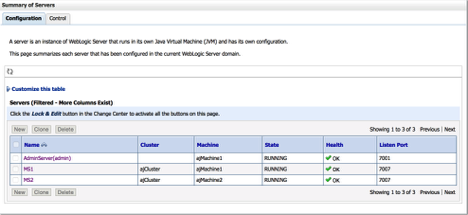
To show this, I have 2 Virtual machines, on which I configured a cluster in a domain. After creating a domain, It looks like this:


Admin and MS1 running on - ajMachine1
MS2 running on - ajMachine2


Below are the high level steps for configuring Whole Server Migration:


1. Configure floating IP addresses for each managed server.
2. Set correct sudo privileges for user
3. Configure the node manager on each Machine
4. Configure leasing mechanism.
5. Configure non-xa data source for automatic migration.
6. Configure cluster migration.
7. Configure automatic server migration for each managed server.
8. Test whole server migration.


Step 1
=====
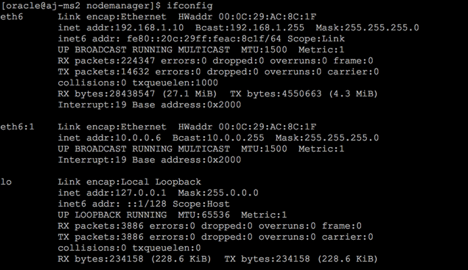
Configure Floating IP address for each host like this, It can be any IP which you assign. But make sure to add them in /etc/hosts file for each node if you are not using any DNS server.


Below if you see, eth6:1 10.0.0.6 is my floating IP on machine 1 and similarly create another VIP  eth6:1 10.0.0.7 for machine 2


Step 2
=====
In /etc/sudoers file, add these lines:


Step 3
======
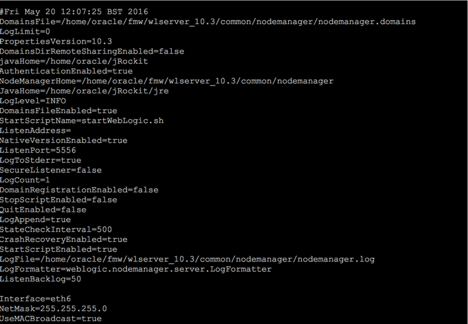
In nodemanager.properties file, add the below lines, so when you start managed server using NM, it will mount the associated VIP.


Step 4
=====
Run the below queries in Database:
SQL> create tablespace leasing datafile '/u01/app/oracle/oradata/orcl/leasing.dbf' maxsize 2048m extent management local;


Tablespace created.


SQL> create user leasing identified by oracle123;


User created.


SQL> grant create table to leasing;


Grant succeeded.


SQL> grant create session to leasing;


Grant succeeded.


SQL> alter user leasing default tablespace leasing;


User altered.


SQL> alter user leasing quota unlimited on leasing;


User altered.


SQL> exit


Create ACTIVE Table:
=====================
The ddl to create can be found at $WLSERVER_HOME/server/db/oracle/920/leasing.ddl


[oracle@db tmp]$ sqlplus leasing/Password123


SQL*Plus: Release 11.2.0.1.0 Production on Sat May 21 15:09:25 2016


Copyright (c) 1982, 2009, Oracle.  All rights reserved.

Connected to:
Oracle Database 11g Enterprise Edition Release 11.2.0.1.0 - 64bit Production
With the Partitioning, OLAP, Data Mining and Real Application Testing options


SQL> @leasing.ddl
SP2-0734: unknown command beginning "WebLogic S..." - rest of line ignored.
SP2-0734: unknown command beginning "Copyright ..." - rest of line ignored.
DROP TABLE ACTIVE
          *
ERROR at line 1:
ORA-00942: table or view does not exist


Table created.


SQL> desc Active
Name                                      Null?    Type
----------------------------------------- -------- ----------------------------
SERVER                                    NOT NULL VARCHAR2(150)
INSTANCE                                  NOT NULL VARCHAR2(100)
DOMAINNAME                                NOT NULL VARCHAR2(50)
CLUSTERNAME                               NOT NULL VARCHAR2(50)

TIMEOUT                                            DATE


SQL> select * from Active;


no rows selected


Step 5
======
On the Admin Console, create non-xa data source, pointing to leasing schema (created above) and target it to the cluster


Step 6
=====
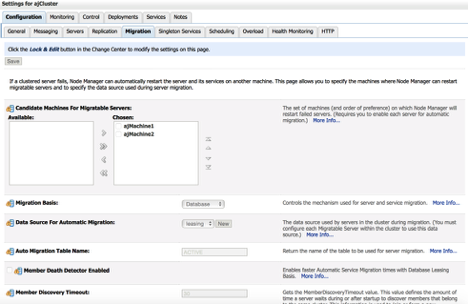
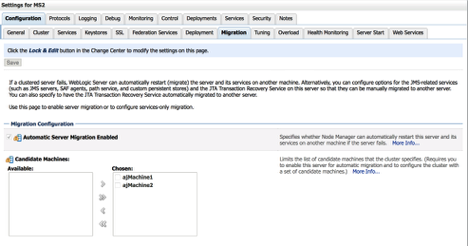
Navigate to Environments - > Cluster, and click on cluster ->Migration tab.
Update as below:


Step 7
======
Click on MS1 and go to migration tab, and update as below:


Similar for MS2 as well.


Step 8
=====
Now restart all the servers and test the migration.


Kill MS2 and Nodemanager on Node2. After few seconds, you will see, MS2 will get started on Node1


After killing MS2 server on Node2


It starts up on Node1:


Wednesday, 23 March 2016

readDomain() on Unpacked Weblogic 12C Domain Not Working

We have observed the below issue on 12.1.3 version of weblogic server.

As a part of pack-unpack to create a managed server we have performed the below steps :

--> Created a domain
--> Created a jar file of the domain using the pack utility :

./pack.sh -managed=true -domain=<User_Project_Dir> /domains/<Domain_Name> -template=<User_Project_Dir>/domains/<Domain_Name>.jar -template_name="<Domain_name>"

This will create the jar file at the location.

--> We have tried to unpack the same at the managed server location. Unpack was successfull.

After completion of unpack, we were unable to read the domain.

Connect to WLST :

After connecting to the WLST :
--> readDomain(<Original Domain Directory Location>)

This worked fine

--> readDomain(<domainDirecotry of the unpacked domain>)
This did not work with the below error :

com.oracle.cie.domain.script.jython.WLSTException: com.oracle.cie.domain.script.ScriptException: com.oracle.cie.common.CommonException: fail to load domain from directory
Root Cause: java.lang.reflect.InvocationTargetException

Caused by: com.oracle.cie.domain.script.ScriptException: com.oracle.cie.common.CommonException: fail to load domain from directory
Root Cause: java.lang.reflect.InvocationTargetException
        at com.oracle.cie.domain.script.ScriptExecutor.readTemplate(ScriptExecutor.java:542)
        at com.oracle.cie.domain.script.jython.WLScriptContext.readDomain(WLScriptContext.java:746)
        ... 30 more
Caused by: com.oracle.cie.common.CommonException: fail to load domain from directory
Root Cause: java.lang.reflect.InvocationTargetException


This error was not observed in the 10.3.6 version of weblogic server. This has been reported as a bug with Oracle and currently ( as on 23rd March 2016 ), Oracle is working on resolving the issue.

We will keep this post updated once the issue is resolved.


However, as a temporary work around, please use the pack command with the syntax "managed=false"

This is only a temporary work around and not a permanent solution.

Friday, 26 February 2016

OHS 12.1.3 does not come up after fresh installation

OHS Component 12.1.3 does not come up after fresh installation. We have performed a standard alone installation of OHS. Below is the sequence of steps we have followed :

--> Installed OHS 12.1.3
--> Configured the OHS domain
--> Started Node Manager.
--> Node Manager works fine
--> Tried to start OHS component. OHS doesn't start up with the below error.

./startComponent.sh ohs2
Starting system Component ohs2 ...

Initializing WebLogic Scripting Tool (WLST) ...

Welcome to WebLogic Server Administration Scripting Shell

Type help() for help on available commands

Reading domain from /u01/ofsaa/local/user_projects/domains/ohs12c_domain


Please enter Node Manager password:
Connecting to Node Manager ...
Successfully Connected to Node Manager.
Starting server ohs2 ...
Error Starting server ohs2: weblogic.nodemanager.NMException: Received error message from Node Manager Server: [Server start command for OHS server 'ohs2' failed due to: [Unable to find template directory /u01/ofsaa/local/fmw/ohs/templates/conf within OHS installation at /u01/ofsaa/local/fmw/ohs. Make sure that /u01/ofsaa/local/fmw/ohs contains a valid OHS installation.]. Please check Node Manager log and/or server 'ohs2' log for detailed information.]. Please check Node Manager log for details.
Successfully disconnected from Node Manager.


Exiting WebLogic Scripting Tool.

Done

--> The cause of this issue is that installation of OHS has been done with invalid values of ORACLE_HOME and MW_HOME in .profile

--> Follow the below steps to resolve the issue.
--> Comment the entries of MW_HOME and ORACLE_HOME in .profile
--> Deinstall OHS ( Please be sure to run deinstall.sh in order to perform the deinstall. Just deleting the OHS folder will not work )
--> Reinstall OHS
--> Try to start the OHS now.
--> This should resolve the issue.

Wednesday, 17 February 2016

keytool error: java.io.IOException: Invalid keystore format

While listing the certificates from .oamkeystore was getting below error:

oracle@aj-oamr2 fmwconfig]$ ls -la .oamkeystore

-rw-r-----. 1 oracle oinstall 10441 Feb  2 11:33 .oamkeystore

[oracle@aj-oamr2 fmwconfig]$ keytool -list -keystore .oamkeystore -storepass <password>
keytool error: java.io.IOException: Invalid keystore format

The problem is with the keystore type which needs to be also defined in the above command.

Example:

[oracle@aj-oamr2 fmwconfig]$ keytool -list -keystore .oamkeystore -storetype JCEKS -storepass <password>

Keystore type: JCEKS
Keystore provider: SunJCE

Your keystore contains 12 entries

adminserver, Feb 2, 2016, PrivateKeyEntry,
Certificate fingerprint (SHA1): C2:48:94:91:54:A0:BC:5A:11:A7:42:EC:27:9C:8B:57:4C:D0:07:0E
coherence, Feb 2, 2016, SecretKeyEntry,


Monday, 15 February 2016

How to retrieve .oamkeystore password in 11gR2PS3

While attempting to get the keystore password using listCred() wlst command, I got the below error:

wls:/oam_domain/domainRuntime> listCred(map="OAM_STORE",key="jks")
Traceback (innermost last):
  File "<console>", line 1, in ?
NameError: listCred


wls:/oam_domain/domainRuntime> help('listCred')
No help for listCred found. Please try help() for available options.


Oracle has removed listCred wlst command and is no longer available in OAM 11.1.2.3.0

To retrive the .oamkeystore password follow the below steps:

1) Log into to EM console, navigate to Weblogic Domain ->Domain Name ->System Mbean Browser 
Under Application Defined Mbean go to om.oracle.jps ->Domain:<domain_name> -> JpsCredentialStore ->JpsCredentialStore 
As shown


2) Click Operation tab and select getPortableCredential


 3) Enter both the parameters as shown


4) Click on Invoke to get the password


Sunday, 14 February 2016

Java.lang.OutOfMemoryError" Error When Applying Oracle Weblogic Server Patch

While applying the latest PSU for Weblogic, you might get below error:

./bsu.sh -install -patch_download_dir=/home/oracle/fmw/product/112/utils/bsu/cache_dir -patchlist=S8C2 -prod_dir=/home/oracle/fmw/product/112/wlserver_10.3/

Exception in thread "main" java.lang.OutOfMemoryError: Java heap space
        at java.util.HashMap.createEntry(HashMap.java:897)
        at java.util.HashMap.addEntry(HashMap.java:884)
        at java.util.HashMap.put(HashMap.java:505)
        at com.bea.cie.common.dao.xbean.XBeanDataHandler.loadPropertyMap(XBeanDataHandler.java:778)
        at com.bea.cie.common.dao.xbean.XBeanDataHandler.<init>(XBeanDataHandler.java:99)
        at com.bea.cie.common.dao.xbean.XBeanDataHandler.createDataHandler(XBeanDataHandler.java:559)

Cause:
The memory arguments are in bsu.sh are not sufficient

Solution:
1) Go to <Middleware_home>/utils/bsu
2) Take backup of bsu.sh and edit as below

[oracle@aj-oamr2 bsu]$ diff bsu.sh bsu.sh_bkup
5c5
< MEM_ARGS="-Xms1024m -Xmx1024m"
---
> MEM_ARGS="-Xms256m -Xmx512m"

4) Apply the patch
[oracle@aj-oamr2 bsu]$ ./bsu.sh -install -patch_download_dir=/home/oracle/fmw/product/112/utils/bsu/cache_dir -patchlist=S8C2 -prod_dir=/home/oracle/fmw/product/112/wlserver_10.3/
Checking for conflicts.....
No conflict(s) detected

Installing Patch ID: S8C2..
Result: Success


Saturday, 13 February 2016

How to enable Federation Services in OAM 11gR2PS3 ?

By default Identity Federation Service is not enabled. To enable it, you need to go to Available Services and enable it. If the ‘Enable Service’ link is greyed out, try to disable ‘Mobile and Social' and then Enable it.

Looks like a bug, but that is the only way I was able to enable the Federation Services :)

Friday, 12 February 2016

Upgrading OAM to 11gR2PS3(11.1.2.3)

Recently I tried to upgrade OAM from 11gR2 (11.1.2.0) to 11gR2PS3 (11.1.2.3)

Here are the high level steps for upgrading. The steps are simple and self explanatory.  It was a smooth upgrade with no major issues.

1) Upgrade OAM binaries to PS3: This step is a typical OAM installation process and it will update binaries. Give the same Oracle Home as already present for IAM installation.

2) Upgrade oam, IAU and opss schema:
- Can be done by running psa (<MW_HOME>/oracle_common/bin/)

3) Copy Mbean: Run the below command from IAM home

wls:/offline> copyMbeanXmlFiles('/home/oracle/admin/user_projects/domains/oam_domain','/home/oracle/fmw/product/112/iamR2')
LOGGER intialised java.util.logging.Logger@133b514c

 ===============================================
STATUS: SUCCESS
The mbean xml files have been upgraded to new version.
The original mbean xml is saved in "<domain_directory>/output/upgrade".
Please restart the admin and oam servers.
 ===============================================

4) Upgrade OPSS: This step upgrades the OPSS with configuration and policy stores to PS3. It upgrades jps-config.xml and policy stores. 

upgradeOpss(jpsConfig=“/home/oracle/admin/user_projects/domains/oam_domain/config/fmwconfig/jps-config.xml”,jaznData=“/home/oracle/fmw/product/112/oracle_common/modules/oracle.jps_11.1.1/domain_config/system-jazn-data.xml”, auditStore=“/home/oracle/fmw/product/112/oracle_common/modules/oracle.jps_11.1.1/domain_config/audit-store.xml”, jdbcDriver=“oracle.jdbc.OracleDriver”, url=“jdbc:oracle:thin:@<db_host>:<db_port>/<sid>”, user=“<prefix>_OPSS”, password=“<opss_schema_password>”, upgradeJseStoreType=“true”)


5) Undeploying Coherence: This step un-deploys old coherence library, as with PS3, latest version of coherence gets deployed.

wls:/oam_domain/serverConfig> undeploy('coherence#3.7.1.1@3.7.1.1')
Undeploying application coherence#3.7.1.1@3.7.1.1 ...
<Feb 9, 2016 9:31:16 PM GMT> <Info> <J2EE Deployment SPI> <BEA-260121> <Initiating undeploy operation for application, coherence#3.7.1.1@3.7.1.1 [archive: null], to AdminServer oam_server1 .>
.Completed the undeployment of Application with status completed
Current Status of your Deployment:
Deployment command type: undeploy
Deployment State       : completed
Deployment Message     : [Deployer:149194]Operation 'remove' on application 'coherence [LibSpecVersion=3.7.1.1,LibImplVersion=3.7.1.1]' has succeeded on 'AdminServer'

6) Upgrading System Configuration:
a) Go to the directory ORACLE_HOME/common/script_handlers.
b) Remove all the .class files by running the following command:
c) rm *.class
Run the below command from IAM home by running wlst:

upgradeConfig("/home/oracle/admin/user_projects/domains/oam_domain", "sys", “<sys_password>”, “<prefix>_OAM", "jdbc:oracle:thin:@<db_host>:<db_port>/<service_name>”)


Feb 09, 2016 9:14:40 PM oracle.security.am.admin.config.util.GenericFactory locateMethod
INFO: Factory methods not declared for type: DecreaseDeviceStoreCacheRuntimeCacheSize.
Feb 09, 2016 9:14:40 PM oracle.security.am.admin.config.BasicFileConfigurationStore applyUpdates
INFO: Applying configuration update at path /. Current version of configuration 108. Change initiated on this node: true
Feb 09, 2016 9:14:40 PM oracle.security.am.upgrade.framework.psfe.PSFEFramework process
INFO: Plugin oracle.security.am.upgrade.framework.psfe.plugin.PSFEDefaultPlugin successfully processed and validated for featureID:                                 acheSize
Feb 09, 2016 9:14:41 PM oracle.security.am.admin.config.util.GenericFactory locateMethod
INFO: Factory methods not declared for type: VersionUpdate.
Feb 09, 2016 9:14:41 PM oracle.security.am.admin.config.BasicFileConfigurationStore applyUpdates
INFO: Applying configuration update at path /. Current version of configuration 109. Change initiated on this node: true
Feb 09, 2016 9:14:42 PM oracle.security.am.upgrade.framework.psfe.PSFEFramework process
INFO: System configurations have been successfully upgraded to version: 11.1.2.3.0


Restart the services and start exploring new OAM interface !

Tuesday, 9 February 2016

om.bea.security.providers.authorization.asi.InvocationException: ArmeRUNTIME Exception: null

Below stack trace of exception is seen after starting managed server in oam logs:

Oracle Access Manager - Version 11.1.2.0.0

<Feb 9, 2016 3:09:45 PM GMT> <Error> <oracle.jps.authorization.framework> <JPS-03156> <The exception has been thrown by ARME. The authorization result is set to deny.
com.bea.security.providers.authorization.asi.InvocationException: ArmeRUNTIME Exception: null
        at com.bea.security.providers.authorization.asi.AuthorizationProviderImpl.isAccessAllowed(AuthorizationProviderImpl.java:396)
        at com.bea.security.ssal.micro.MicroAuthorizationManagerWrapper.isAccessAllowed(MicroAuthorizationManagerWrapper.java:73)
        at com.bea.security.impl.AuthorizationServiceImpl.isAccessAllowed_internal(AuthorizationServiceImpl.java:914)
        at com.bea.security.impl.AuthorizationServiceImpl.isAccessAllowed(AuthorizationServiceImpl.java:745)
        at com.bea.security.impl.AuthorizationServiceImpl.isAccessAllowed(AuthorizationServiceImpl.java:668)
        at com.bea.security.impl.AuthorizationServiceImpl.isAccessAllowed(AuthorizationServiceImpl.java:622)
        at com.bea.security.AuthorizationService.isAccessAllowed(AuthorizationService.java:365)
        at oracle.security.am.common.policy.runtime.provider.oes.proxy.OESRuntimeProxy.wait4OESRuntimeDBPolicyRefreshCompletion(OESRuntimeProxy.java:263)
        at oracle.security.am.common.policy.runtime.provider.oes.proxy.OESRuntimeProxy.init(OESRuntimeProxy.java:193)
        at oracle.security.am.common.policy.runtime.provider.oes.OESPolicyRuntimeProvider.init(OESPolicyRuntimeProvider.java:167)
        at oracle.security.am.common.policy.runtime.PolicyRuntimeFactory.getNewInstance(PolicyRuntimeFactory.java:162)
        at oracle.security.am.common.policy.runtime.PolicyRuntimeFactory.init(PolicyRuntimeFactory.java:93)
        at oracle.security.am.common.policy.runtime.PolicyRuntimeFactory.getPolicyRuntime(PolicyRuntimeFactory.java:84)
        at oracle.security.am.common.policy.util.PolicyComponentLifecycle.initialize(PolicyComponentLifecycle.java:100)


As per Doc ID (1509559.1), these are harmless exceptions and can be ignored.

Monday, 8 February 2016

The policy store is not available; please see the log files for more details

After installing OAM 11gR2, you are getting error while loging into oamconsole.

You did the same mistake which I did of not reading the product documentation before starting with the installation.(http://docs.oracle.com/cd/E27559_01/install.1112/e27301/install.htm#INOAM98374)

There is an additional step in OAM 11gR2 (11.1.2.0) which says before starting up the servers, you need to configure the Security Store.

Follow the below steps to fix this error:

Solution
-----------
1) Delete the Domain
2) Remove the schema from RCU
3) Create the schema again.
4) Create the domain by running config.sh
5) Now the missed step, run the configSecurityStore as below:

$MIDDLWARE_HOME/oracle_common/common/bin/wlst.sh
$ORACLE_HOME/common/tools/configureSecurityStore.py -d $DOMAIN_HOME -c IAM -p <opss_schema_password>
-m create

6) Start up the servers.

This should fix the issue.

Sunday, 7 February 2016

webgate.so: undefined symbol: nzos_GetSessionMasterSecret

While starting ohs, I was getting below errors in ohs1.log after I configured Webgate 11.2.3.0 with OHS 11.1.1.7


ERROR
--------------

/home/oracle/fmw/products/111/ohs_117/ohs/bin/apachectl startssl: execing httpd
httpd.worker: Syntax error on line 1035 of /home/oracle/admin/ohs_instances/config/OHS/ohs1/httpd.conf: Syntax error on line 4 of /home/oracle/admin/ohs_instances/config/OHS/ohs1/webgate.conf: Cannot load /home/oracle/fmw/products/111/oamWebgateR2/webgate/ohs/lib/webgate.so into server: /home/oracle/fmw/products/111/oamWebgateR2/webgate/ohs/lib/webgate.so: undefined symbol: nzos_GetSessionMasterSecret

ISSUE
-----------

Above error is caused by using incompatible version of Webgate with corresponding OHS
Webgate version 11.1.2.3 requires OHS 11.1.1.9 version. I was on OHS 11.1.1.7

Solution
-------------

For OHS 11.1.1.7 version you have to use Webgate 11.1.2.2.


Sunday, 20 September 2015

ORA-00600: internal error code, arguments: [kcratr_scan_lastbwr], [], [], [], [], [], [], [], [], [], [], []


You might face this error while starting Database.

SQL> startup
ORACLE instance started.

Total System Global Area 9620525056 bytes
Fixed Size                  2261368 bytes
Variable Size            3254783624 bytes
Database Buffers         6341787648 bytes
Redo Buffers               21692416 bytes
Database mounted.
ORA-00600: internal error code, arguments: [kcratr_scan_lastbwr], [], [], [],
[], [], [], [], [], [], [], []


Reason: It is due to server crash might be due to hardware or power failure.

Solution:

Recover the database by following the below steps:

Step 1) Shutdown the instance and open in mount state:

SQL>shutdown immediate;
ORACLE instance shut down.

SQL> startup mount;
ORACLE instance started.

Total System Global Area 9620525056 bytes
Fixed Size                  2261368 bytes
Variable Size            3254783624 bytes
Database Buffers         6341787648 bytes
Redo Buffers               21692416 bytes
Database mounted.

Step 2) Recover Database

SQL> recover database;
Media recovery complete.

Step 3) Open the Database

SQL> alter database open;

Database altered.

Step 4) Shutdown and startup normally

SQL> shutdown immediate;
Database closed.
Database dismounted.
ORACLE instance shut down.


SQL> startup
ORACLE instance started.

Total System Global Area 9620525056 bytes
Fixed Size                  2261368 bytes
Variable Size            3254783624 bytes
Database Buffers         6341787648 bytes
Redo Buffers               21692416 bytes
Database mounted.
Database opened.

Monday, 6 July 2015

Fusion Applications Installation - Part 1

Fusion Applications Installation comprises of 2 parts
Part 1) IDM node Installation
Part 2) FA node Installation
Node 1
idmhost
1. Identity and Access Management components
(OID, OVD, OIF, OAM, OIM, SOA)
2. Oracle Database for IDM
Node 2
fahost
1. Fusion Applications Domains
2. Oracle Database for Fusion Apps
Hardware Requirements:

IDM Node:
Memory: Minimum 16GB
Disk Size – 300GB

FA Node:
Memory Requirement: 140GB
Disk Size – 500GB
We will use Oracle Linux x86-64 Operating System for Installation. Software can be downloaded from http://edelivery.oracle.com

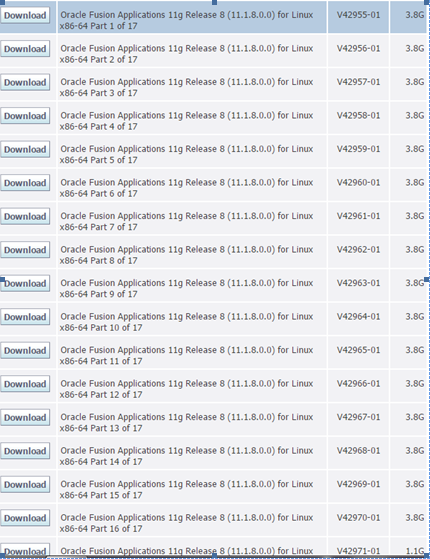
1)   Downloading the Installation media

Download first 17 parts of installable:

2)   Create a staging directory
Unzip all the files in single directory.

More on this will be covered in next post !

Thursday, 2 July 2015

Fusion Applications Product and Product offerings

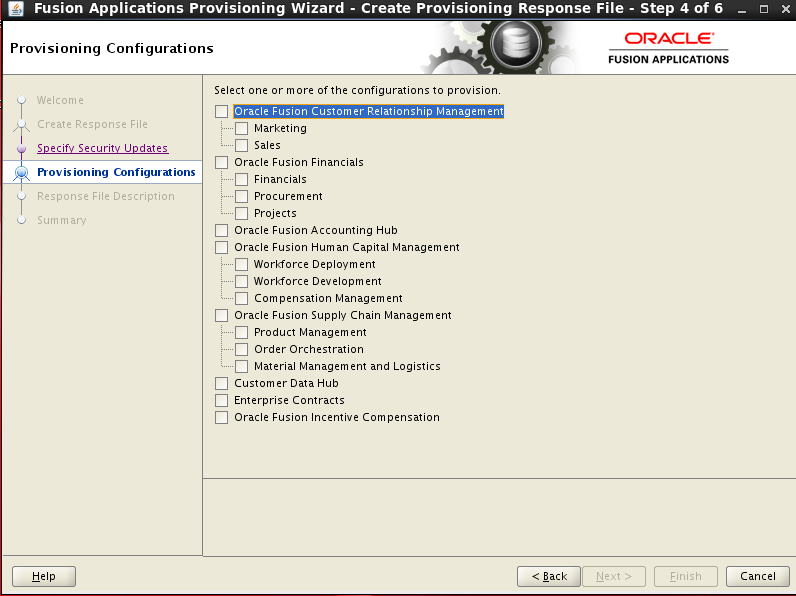
Each product in Fusion Applications is deployed as a Domain. Each domain has J2EE applications which provides certain functionality. These functionality or features provided by the J2EE applications can be considered as product offerings.
A product family is collection of one or more product offerings.

During installation of Fusion Applications you will get the below screen, where you can select a product or product offerings as per your requirement.

image.png

Please note, once selected it cannot be changed later during/after installation, so be very sure before you click on Next button.

A brief description of various Product Family as below:

Product Family
Product Offering
Oracle Fusion Customer Relationship Management
Marketing
Sales
Customer Data Hub
Enterprise Contracts
Oracle Fusion Financials
Financials
Accounting Hub
Oracle Fusion Human Capital Management
Workforce Deployment
Workforce Development
Compensation Management
Oracle Fusion Procurement
Procurement
Oracle Fusion Supply Chain Management
•Product Management
•Order Orchestration
•Material Management and Logistics
Oracle Fusion Project Portfolio Management
Projects